 Ashington OS
The Comeback OS.
Your PC’s Plan B.
Boot Ashington OS from USB to browse with Firefox, stream, join web conferences, open supported files, or connect to another Windows PC. Reuse compatible hardware when Windows security support has ended—or when a missing boot device stops Windows from starting.
Prepared USB: $39.95 plus applicable tax, with free US shipping. Free ZIP includes the ISO + Windows-visible folder. Explore Ashington OS
The hardware may still work even when Windows cannot.
Ashington OS gives an older PC another way to start and another set of useful jobs.
Windows security support has ended
Use a current USB operating system for web access instead of starting unsupported Windows. Keep a working screen, keyboard and network connection in service.
Why a live USB helps →“No boot device”—but the PC still works
A missing, removed or unbootable internal drive need not end the computer’s usefulness. If it can boot from USB, use it for browsing, supported files on another drive, or Remote Desktop.
Start from USB →Windows will not start. Your files may still be there.
Your photos and documents are not necessarily lost. Use Ashington OS to find files that remain readable and copy them to a separate physical drive.
Recover readable files →No technical toolbox. Just familiar choices.
A Windows-like KDE Plasma desktop keeps the main jobs visible and leaves advanced Linux tools in a secondary area.
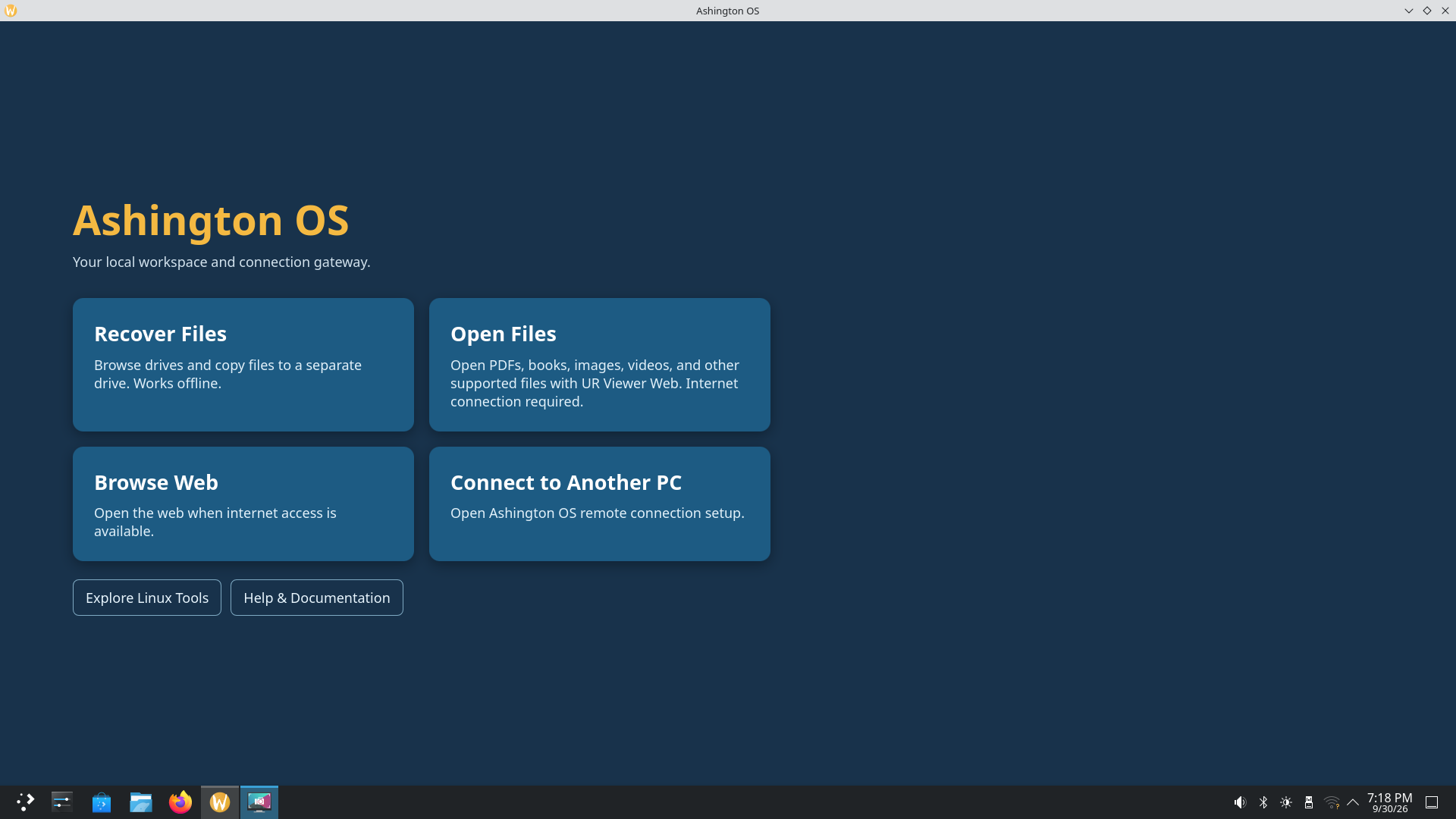
Recover Files
Select a source, choose files, select a separate destination, and follow the transfer in one guided window.
Explore recovery →02Open Files
Open UR Viewer Web in Chromium, then choose a supported local file. An internet connection is required.
See supported files →03Browse Web
Use Firefox for streaming, web conferencing and everyday websites. Chromium is also available for ordinary browsing.
Learn about web access →04Connect to Another PC
Prepare a Windows host with RDP Host Setup, connect from this PC, and use Undo to restore the host’s saved settings.
Understand connection →“I don’t need to repair the whole computer. I just need my files.”
That is the moment Ashington OS is designed for. It starts independently from the computer’s USB port, so you may be able to reach an internal drive even when the installed operating system will not start.
Internal drives are approached read-only by default to reduce unintended changes.
Recovered files are copied to another physical drive—not back onto the source.
A guided copy process is designed to show progress, preserve partial work and record errors.
Browse without starting unsupported Windows.
The live USB starts a separate operating system. In the standard temporary session, a reboot gives you a fresh workspace instead of retaining the previous session’s browser changes.
This can reduce exposure to malware in the installed Windows environment and to changes left behind between sessions. Normal USB booting does not install over Windows, and the guided recovery workflow opens its source read-only.
The security benefit depends on using a trusted, current Ashington OS image. Rebooting an outdated image does not update it, and a live USB cannot prevent phishing or every kind of compromise.
Understand live USB securityAfter starting Ashington OS, Firefox may take about two minutes to appear and Chromium about one minute on a test PC. Click once and wait. Later openings in the same session are usually much faster.
What to expect on first launchUR Viewer Web helps open the files whose usual applications cannot.
If Windows will not start, Acrobat, your ebook reader, photo application, media player and PowerPoint may all be unavailable too. Ashington OS gives you a working browser and a direct path to UR Viewer Web, so compatible local files can still open without repairing Windows first.
One Viewer for many formats
Open supported PDFs, ebooks, comics, images, presentations, text, audio and video in a consistent browser workspace.
Your selected file stays local
The Viewer loads online, then the browser reads the file on the computer. It is not uploaded to a UR Suite server.
A network connection is required
Open Files first connects Ashington OS to the internet so UR Viewer Web can load before you select a compatible file.
Get Ashington OS.
We’ll email you both options: the free download to make your own USB, or a ready-to-use USB for $39.95 USD plus applicable tax, with free US shipping.
No purchase required. Free download worldwide. USB shipping within the United States.